Browser extension · Chrome, Edge & Firefox
Reply to every lead without leaving the thread
The Larvabot extension puts the people asking for what you sell, and the reply drafted for each, in a side panel next to whatever you're browsing. Copy a reply and open the thread in one click, then post it yourself. It never reads the pages you visit and never posts for you, so your accounts stay safe.
Included in every plan and the 14-day free trial. No website permissions requested.
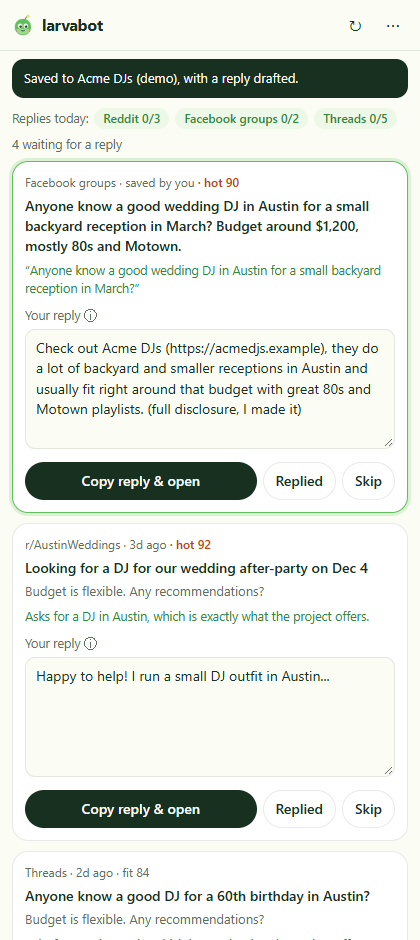
Your drafts, next to the thread
The side panel lists the conversations waiting for a reply, best first, with Larvabot's draft for each. Edit it right there.
Copy & open in one click
The reply is copied and the thread opens. Paste, check it reads right, post it from your own account, then click Replied.
Right-click to save a post
Found someone asking in a Facebook group or on LinkedIn? Select their words, right-click, Save to Larvabot. A reply is drafted in seconds.
Built to keep your accounts safe
Faster replies, with nothing for a platform to flag
✓Never reads the pages you visit
No access to any website: it can't scan, record or change a page, so there's nothing for a platform to flag.
✓Never posts for you
You paste and post every reply yourself, from your own account, the way each platform expects.
✓A safe pace, per platform
Replies today are counted against a safe daily pace for Reddit, Facebook groups, LinkedIn, X and the rest, with each platform's main rule a hover away.
✓Only what you choose to send
Saving sends just the text you selected and the page address. Nothing else leaves your browser.
Why this matters: outreach without being a spammer · Full details in the extension docs and privacy policy.
Frequently asked questions
Where do I get the Larvabot extension?
From the Chrome Web Store (search for Larvabot, or use the Add to Chrome button on larvabot.com/extension). It installs in Chrome, Microsoft Edge, Brave and other Chromium browsers. It's coming soon to Firefox Add-ons too.
Which browsers does the Larvabot extension work in?
Google Chrome and Microsoft Edge on Windows, Mac, Linux and ChromeOS, and Firefox on desktop (it opens in the Firefox sidebar). Other Chromium browsers like Brave and Arc can install it from the Chrome Web Store too. The Firefox version is coming soon to Firefox Add-ons.
Can the extension get my Reddit, LinkedIn or Facebook account banned?
It's designed not to. It has no access to the pages you visit and never posts, comments or clicks for you, so there's no automation for a platform to detect. You post every reply yourself, and the panel shows a safe daily pace for each platform.
Does it read or scrape the pages I visit?
No. The extension asks for no website access at all. When you right-click Save to Larvabot, your browser passes it only the text you selected and the page's address.
Is the extension free?
Yes, it's included in every Larvabot plan and the 14-day free trial. You need a Larvabot account to sign in.
How is it different from the Larvabot dashboard?
It's the same conversations and drafts, in a side panel next to the thread you're replying to, so there's no switching tabs to copy and paste. Saving a post with a right-click is only in the extension.
Find the people asking first
Larvabot finds posts asking for what you sell on Threads, Reddit, X, Facebook groups and more, and drafts your reply. 14 days free, no card required.