Apps & official listings
Larvabot on Windows, in Claude and wherever you work
Larvabot finds the people already asking for what you sell and drafts your reply. Use it in the browser, install the official app from the Microsoft Store, or connect it to Claude from Claude's connector directory and ask about your leads in plain words.
Microsoft Store · Windows 10 & 11
The official Larvabot app for Windows
Install Larvabot from the Microsoft Store and it opens in its own window, straight to your projects, with notifications for replies and hot conversations.
- Opens in its own window, straight to your projects, and pins to the taskbar and Start menu.
- Desktop notifications when a lead replies, a draft is waiting or a hot conversation turns up.
- Jump-list shortcuts: right-click the icon to add a project, see activity or open settings.
- Always up to date: it's the same Larvabot as app.larvabot.com, so there's nothing to update by hand.
- Free to install. Sign in with your Larvabot account, or start the 14-day trial from the app.

Chrome, Edge & Firefox
The Larvabot browser extension
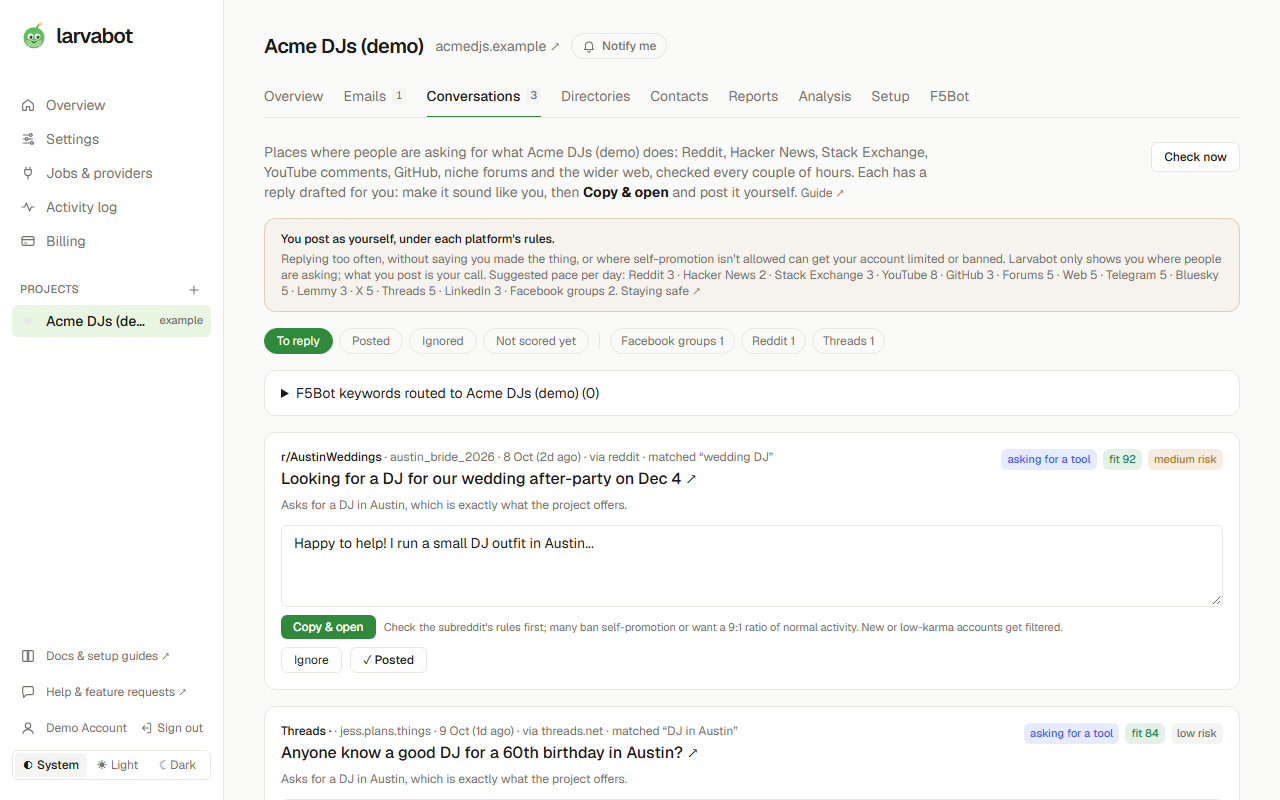
Your drafted replies in a side panel next to the thread: copy a reply and open the post in one click, mark it replied, and save any post you find with a right-click. It never reads the pages you visit and never posts for you.
Claude Directory · official connector
The official Larvabot connector in Claude's directory
Larvabot is a reviewed connector in Claude's directory. Connect it in a click and ask Claude what to reply to today, which leads replied this week, or to tighten a drafted email. It's read-only, so Claude never posts or sends anything for you.
- “What should I reply to today? Give me the top 5 conversations with their drafts.”
- “Which leads replied this week, and what did each one want?”
- “Rewrite the draft for the café that replied so it's under 80 words.”
Smithery · quality score 85/100
Featured on Smithery, the MCP server registry
Larvabot's MCP server is listed on Smithery with a quality score of 85/100, ready for Claude, Cursor, VS Code and any other MCP client. Add https://app.larvabot.com/api/mcp to any MCP client, or install it from Smithery.
Mac, iPhone and Android
Open app.larvabot.com and add it to your dock or home screen: it opens like an app, signed in, with push notifications.
Install it on any device →Zapier, Make and n8n
The Larvabot apps for Zapier, Make and n8n work today. Larvabot is in Zapier's app directory, and the n8n node is on npm. Coming soon to the Make app directory and n8n verified community nodes.
Frequently asked questions
Is there an official Larvabot app for Windows?
Yes. Larvabot is on the Microsoft Store (product ID 9NW6VFB2TTK3). It installs like any Windows 10 or 11 app and opens in its own window, with desktop notifications.
Is the Windows app different from the web app?
It's the same Larvabot, with the same account, projects and data as app.larvabot.com. The Store app adds a desktop window, taskbar icon, notifications and shortcuts, and updates itself.
How do I add Larvabot to Claude?
Open Larvabot in Claude's connector directory (claude.ai/directory/larvabot), click Connect, sign in to Larvabot and click Allow access. Then ask Claude about your leads and conversations.
Is the Larvabot MCP server on Smithery?
Yes. The Larvabot MCP server is listed on Smithery with a quality score of 85/100. The server URL is https://app.larvabot.com/api/mcp and it works in Claude, ChatGPT, Cursor, VS Code and n8n.
Is the Larvabot extension in the Chrome Web Store and Edge Add-ons?
Yes. Get it from the Chrome Web Store (Chrome, Brave and other Chromium browsers) or from Microsoft Edge Add-ons, with the buttons on this page. Firefox is coming soon.
Is there a Larvabot WordPress plugin?
Yes. The official Larvabot plugin is in the WordPress plugin directory (wordpress.org/plugins/larvabot). It adds the cookieless visitor snippet to every page, with one click to connect your project.
Is Larvabot on Zapier?
Yes. Larvabot is an official app in Zapier's app directory (zapier.com/apps/larvabot), with triggers for new leads, contacted leads, replies and new conversations. There's also the n8n-nodes-larvabot node for n8n, published on npm.
Do the apps cost extra?
No. The Windows app, the browser extension, the Claude connector, the MCP server and the Zapier, Make and n8n apps are included in every Larvabot plan and in the free trial.
One account, every app
The Windows app, the browser extension, the Claude connector and the MCP server are included in every plan. 14 days free, no card required.